Result: {{ result }}
``` We’ll update our post request to take an additional param `multiply_by_2` (from `name`). By default, the value is `False`; but if we check the checkbox, we get the value of `True` (from `value`). This boolean is passed into [`spell_number`](https://github.com/eugeneyan/fastapi-html/blob/master/src/model.py) which handles the logic. ```python @app.post('/checkbox') def form_post(request: Request, num: int = Form(...), multiply_by_2: bool = Form(False)): result = spell_number(num, multiply_by_2) return templates.TemplateResponse('checkbox.html', context={'request': request, 'result': result, 'num': num}) ``` Here are the results with and without checking the option. 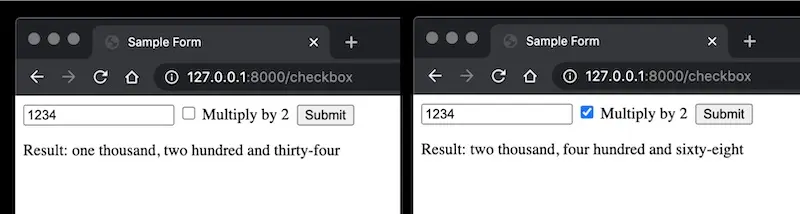 *Results with and without the "Multiply by 2" option* ## Let’s allow users to download results After users view the results, they might want to download it. (In this scenario, it’s a really simple result. Nonetheless, a real app could provide results such as a csv of fraudulent purchases, a pdf report, or an ipython notebook.) To achieve this, we’ll add a [download](https://github.com/eugeneyan/fastapi-html/blob/master/templates/download.html) button. Notice that we now have _two_ inputs of type `submit`. As usual, we’ll use the `name` and `value` params. ```htmlResult: {{ result }}
``` We’ll update the post request with some basic logic to either return the result via HTML, or to download the file. Note that for `FileResponse` to work, we’ll need to install the `aiofiles` package. ```python @app.post('/download') def form_post(request: Request, num: int = Form(...), multiply_by_2: bool = Form(False), action: str = Form(...)): if action == 'convert': result = spell_number(num, multiply_by_2) return templates.TemplateResponse('download.html', context={'request': request, 'result': result, 'num': num}) elif action == 'download': # Requires aiofiles result = spell_number(num, multiply_by_2) filepath = save_to_text(result, num) return FileResponse(filepath, media_type='application/octet-stream', filename='{}.txt'.format(num)) ``` Here’s how the downloaded file looks like. It is named after the input query `1234.txt`. The results will be the input query spelt out (possibly multiply by two). 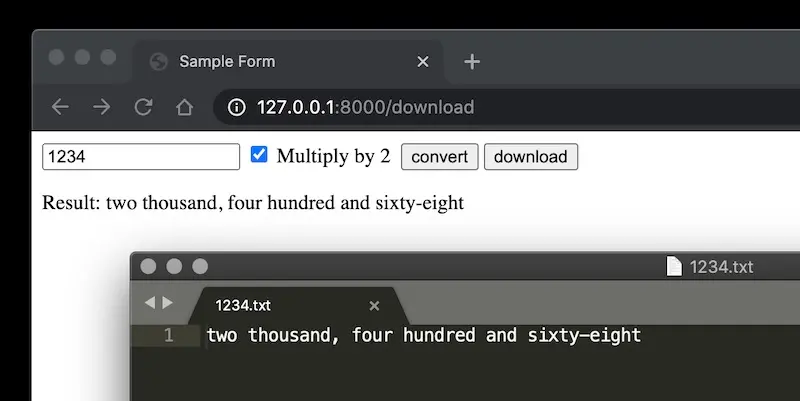 *The downloaded file (1234.txt) and the result (with "Multiply by 2")* > Try it out with the GitHub repo here: [`fastapi-html`](https://github.com/eugeneyan/fastapi-html) > Next, we update our FastAPI app to let users: > > • Select options via a checkbox\ > • Download results via a download button